Can You Hand Busywork to an AI Agent?Train-like automation, self-driving agents, and four experiments you can try tomorrow
Monday morning, 47 emails in the inbox. A refund request is urgent, a quote request cannot slip, and by the time you have read and sorted everything, the work that actually matters keeps sliding down the list.
What if you could tell an AI, “Pick out the urgent ones and draft replies”? Pretty great. But what if, for the “I was charged twice” email from the customer behind order 1042, the AI wrote “We will refund you today” before anyone checked anything? Polite sentence, reckless promise.
So when you hand work to AI, you also decide how far it can go on its own and where a person has to check. This article explains the difference between rule automation, AI workflows and agents, then follows that one email from customer #1042 from start to finish through four small experiments that begin with your inbox. Thirteen hands-on tools come along for the ride.
- Rule automation is a train on fixed tracks; an AI agent is closer to a self-driving car that picks its own route once you name the destination. In between sits the AI workflow, a train line with one AI station, and most first experiments are exactly that.
- No-code tools such as Zapier, Make and n8n let you start with small experiments: sorting email, drafting weekly reports, processing invoices. What the free plans cover differs a lot.
- Anything that spends money or cannot be undone runs only after a person approves it. Mask personal data, and open access and data destinations only as far as you need.
01How many minutes a day go to busywork?
According to a Bank of Korea analysis published in June 2026, using AI cut working hours by 3.8% on average, about 1.5 hours a week.[1][2] But the same analysis found a correlation of 0 between the share of time saved and the growth in work volume. Saving time did not mean getting more done. What matters is what you hand off, and how you use the time you get back.
Workplaces have more dramatic stories too. At Woowa Brothers, the company behind the Korean delivery app Baemin, a designer built a Figma plugin that renamed 1,300 files in three minutes, a chore that used to take an hour.[3] LG Uplus formed a marketer-only “AX task force” in May 2025 with the goal of cutting ad production costs to about 5% of the usual level using generative AI.[4]
What about your day? Move the sliders to enter how much time repetitive work takes. The number may surprise you.
Assumes 230 working days a year. Not all of this time disappears, but trimming even part of it adds up.
02Train, AI station, self-driving car: how automation and agents differ
All three “do work for you”, which is why people mix them up. But they work in quite different ways.
Rule automation is a train on fixed tracks. It follows “if this happens, do that” rules precisely. When an email gets a certain label, save the attachment to Google Drive; when a customer submits a form, post a Slack alert. It is fast, cheap and predictable, and it can handle exceptions you planned for, such as input checks or retries. Tools like Make offer error handlers that retry or skip a failed step.[5] But when a rock nobody expected lands on the track, the train cannot build itself a new route.
An AI workflow is the same train line with an AI station in the middle. An email arrives and rule automation starts the trip; at the AI station the email gets read, sorted or drafted; then fixed conditions send it on to the next stop. The AI does something smart, but a person laid the track.
An AI agent is closer to a self-driving car that picks its own route once you give it a destination. A large language model (LLM) reads the situation and decides what to look up, which tools to use and what to do next. Google Cloud describes AI agents as “software systems that use AI to pursue goals and complete tasks on behalf of users.”[6] OpenAI’s definition is even shorter: “systems that independently accomplish tasks on your behalf.”[7]
The AI company Anthropic draws the line neatly. Workflows are “systems where LLMs and tools are orchestrated through predefined code paths,” while agents are “systems where LLMs dynamically direct their own processes and tool usage, maintaining control over how they accomplish tasks.”[8] OpenAI draws the same line: apps that use an LLM without letting it control the workflow, such as simple chatbots or sentiment classifiers, are not agents.[7]
In other words, an AI that sorts email is not automatically an agent. It gets closer to one when the AI also chooses what to look up, which tools to use and what to do next. Anthropic recommends starting with the simplest solution possible and adding complexity only when needed.[8]
- Who sets the steps
- Rules a person wrote
- Good for
- Alerts, moving files, fixed formats
- Weak spot
- Cannot invent a new route when something unexpected happens
- Who sets the steps
- A person lays the track; AI makes the in-between calls
- Good for
- Sorting email, summaries, drafts, pulling values from documents
- Weak spot
- AI calls can be wrong, so someone checks
- Who sets the steps
- The AI, step by step, toward a goal
- Good for
- Work that hops between tools to look things up and decide
- Weak spot
- Slower, pricier, and can take a wrong turn
More answers landed in the middle than you expected, right? In practice, most first experiments are AI workflows. The track is fixed, so results are predictable and costs stay lower. All four experiments in this article have that shape. To meet a real agent first, follow it as it takes on customer #1042’s case in the next section.
03Anatomy of an agent: eyes, brain, notebook, hands, compass
An agent can work like a “smart intern” because five parts mesh together. Once you know what each part does, you can see what to hand it. Tap each part in the picture.
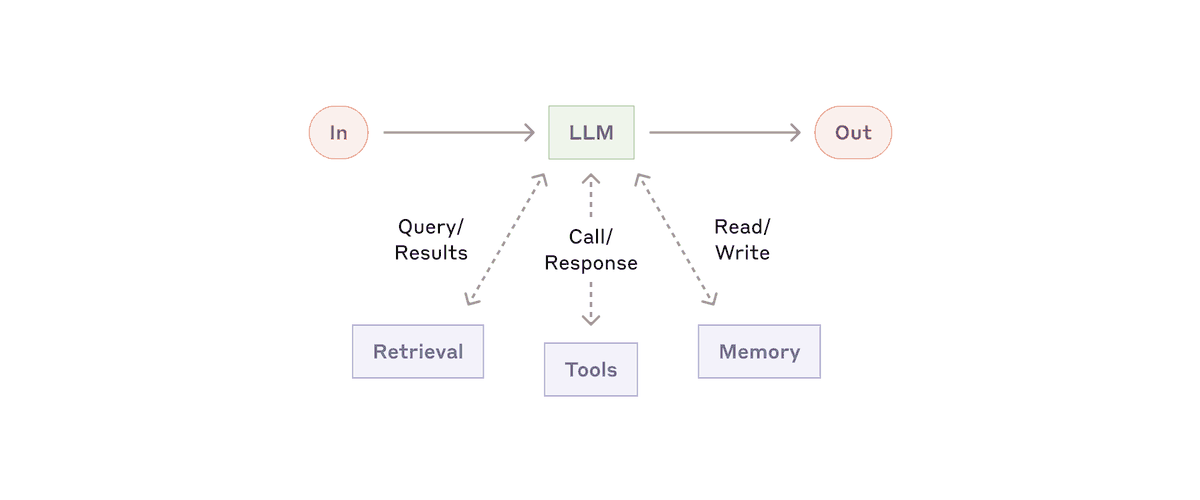
Now let’s give it a real case. Case file #1042The customer behind order 1042 has emailed: “I was charged twice.” The agent repeats a cycle of thinking, using a tool and checking the result, and stops when it reaches the goal or hits a stop condition you set in advance. If a tool throws an error, it looks for another way. Press the button to flip through the case log one line at a time.
An example to show the order of work. Real tool names and steps vary by system.

Three moments are worth noticing: the agent chose what to look up on its own, it retried when a tool failed, and it handed the refund, which moves money, to a person instead of processing it. A good agent knows what not to do. More precisely, we have to design it that way. The reply draft for customer #1042 gets a red-pen check in section 5.
04Three no-code automation tools: Zapier, Make, n8n
“No-code” tools let you build automations by dragging blocks around, no programming required. Here are the three beginners meet most often. Prices are from each company’s pricing page on October 9, 2026, and what the free plans cover differs a lot.
- Connects 9,000+ apps[9]
- Free: 100 tasks/month, but only two-step Zaps (one trigger + one action). Three or more steps need a paid plan (Professional from $19.99/month billed annually, $29.99 monthly)[9]
- Human approval (Human in the Loop) is paid, and on Professional you can only send approval requests to yourself[10]
- Billed per task, so long, frequent workflows get expensive fast
- Formerly called Integromat
- Free: 1,000 credits/month. Core: $9/month for 10,000 credits billed annually, $10.59 monthly. The price shown changes with credit volume and currency[11]
- Strong at branches, loops and error handling (retry, skip)[5]
- Easier if you know a little about data structures like JSON and arrays
- Self-hosted Community Edition is free. If you would rather not run a server, n8n Cloud starts at €20/month billed annually (2,500 executions)[12]
- Licensed under the Sustainable Use License: the source is available, but it is not OSI open source. n8n calls this approach the fair-code model[13]
- LangChain-based AI Agent nodes, memory and vector store nodes, human approval before tool calls[14]
- If you self-host, updates, backups and security are on you
A toy for picking a starting point. All three have free options, but the free tiers cover different things, so try them before deciding.
05Experiment 1: an AI assistant for your inbox
This is the best first experiment. Case file #1042The agent in section 3 chose what to look up on its own. This experiment is simpler: an AI workflow. When an email arrives, the AI reads it, rates its priority and drafts a reply, but the steps always run in the order a person set. For a first try, that is cheaper and safer.
Before you start, remember one order. If you open ChatGPT and shout “do this” right away, results are hit or miss. Good automation experiments follow capture → clarify with AI → create a draft → a person decides.
Catch the moment material arrives: a new email, a form reply, a new sheet row.
The AI reads it and judges its type and priority.
It produces a reply, a summary or a task.
A person decides whether to send, fix or toss it.
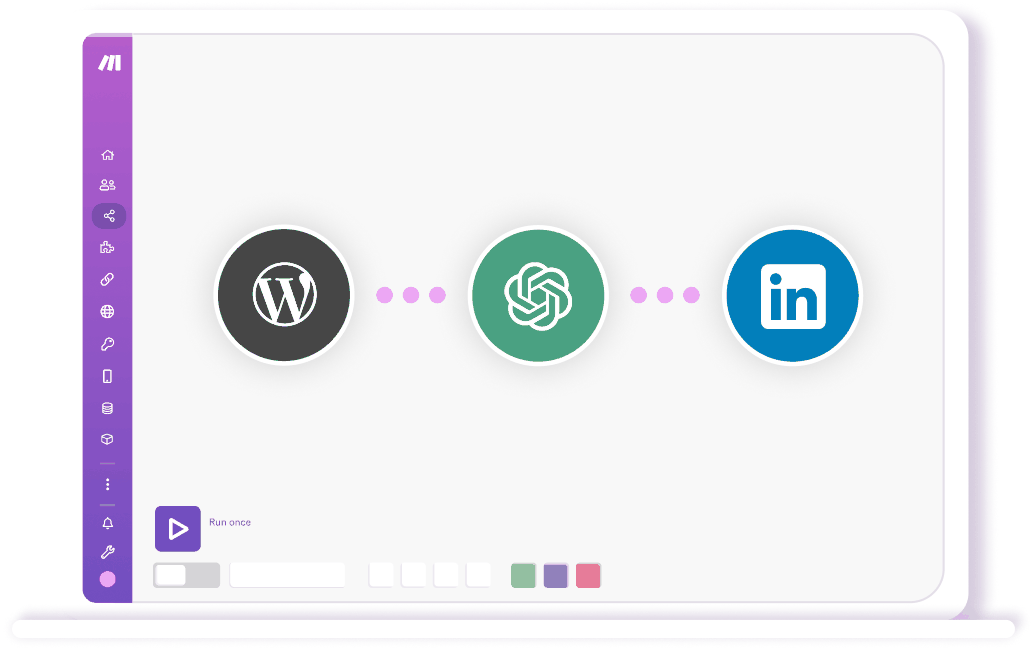
In Zapier it goes like this. (1) Choose “New email in Gmail” as the trigger. At first, narrow it down with a label or sender filter. (2) Add an AI step such as ChatGPT (OpenAI) with a prompt like the one below. (3) Use Paths to split the flow by the priority the AI assigned. That is three or more steps, so Zapier’s free plan (two-step Zaps) cannot build it. Try it during the 14-day Professional trial that comes with a new account.[9]
Why JSON? If you get a nicely written paragraph, the next step cannot easily pull out just the priority. With fields and formats fixed in advance, a path can act precisely: “if priority is High, go this way.” But JSON is only a container that makes values easy to pick up; it does not guarantee the values are right. OpenAI notes that even Structured Outputs, which enforce a format, can still contain mistakes.[16] So check separately that every field is there and that the values make sense. Spelling out the role (who), context (what situation) and goal (what, in which format) is the basis of a good prompt.

The emails and AI results are examples made to show the flow.
Sorry for the trouble. We have confirmed the double charge and will refund it today.We will check your payment history and get back to you on the double charge and how refunds work.
Now, instead of scanning the inbox from the top, you review the important-email summaries and drafts that land in Slack, tweak them and send. For the first two weeks or so, check the AI’s sorting by eye. If you notice a type it keeps getting wrong, adding one or two examples to the prompt usually helps. Writing down what it must not do, like rule 5 above, works well too.
06Experiment 2: the Friday weekly report, drafted for you
Friday afternoon, squeezing a week’s worth of memories into a status report. That can shrink too. Just jot down each finished task as one line in a Google Sheet or form as you go. The rest runs like this.
1. Key wins this week
- Average response time to new customer questions cut from 6 hours to 2
- Fall campaign landing page launched
- Contract terms agreed with two partners
2. Delays and risks
- Payment module review slipped a week because of an outside schedule
3. Focus for next week
- Finish the payment module review; first look at campaign results
The report is an example. In practice, the AI drafts it from what you logged in the sheet.
In Zapier it goes like this. (1) Give the sheet a date column and a “week start” column (that week’s Monday). (2) Set a “Schedule by Zapier” trigger for every Friday at 4 p.m., in the time zone where you actually work. (3) Use the Google Sheets “Lookup Spreadsheet Rows (Advanced)” step to find the rows whose week start is this Monday; it returns up to 500 rows at a time.[17] (4) Ask an AI step to “summarize the top three wins, anything delayed or at risk, and next week’s plan in a business tone.” Send the result to a Slack channel or save it as a draft in Notion.
The blank-page dread of agonizing over the first sentence disappears; you review the draft and add your own judgment. One catch: anything you did not log will not show up in the report. Good ingredients make good food.
07Experiment 3: AI reads the invoice, a person approves it
Never let the AI finish money matters on its own. Let it pull the vendor name, amount and due date out of an invoice PDF, but add a checkpoint where a person confirms the data right before it goes into the accounting system. This is called human-in-the-loop.
The tools already exist. Zapier’s Human in the Loop tool pauses a Zap and asks chosen reviewers to approve or edit the data; it is a paid feature, and reviewers need a Zapier account. On the Professional plan you can only send approval requests to yourself, so getting a colleague’s approval takes Team or above.[10] n8n can require approval, via Slack or email, before an AI agent uses specific tools.[14] Try being the approver below.
One mistake is hidden on purpose. Try approving right away first, then compare the values.
Misreading a single digit happens to people and to AI. Comparing against the original at this one step is what stops a tenfold mistake in the amount. The refund for customer #1042 works the same way: it goes out only after someone checks it against the payment record.
08Experiment 4: customer reviews, angry customers first
When a review or survey answer comes in, the AI classifies the sentiment, alerts someone right away about negative ones and prepares a thank-you draft for positive ones. This is where the difference between rule-based automation and AI really shows. Press both buttons in turn.
| Review | Keyword rules | AI |
|---|---|---|
| Fast shipping and careful packaging. Thank you! | · | · |
| Asked for a refund a week ago and still no answer. | · | · |
| Wow, shipping was really 'fast'. It took three weeks. | · | · |
| I expected the worst, but it turned out much better. | · | · |
| The product is okay. The manual is a bit confusing. | · | · |
The AI results are examples showing how it can read sarcasm and context. Real AI makes mistakes too. Do not only check reviews marked negative; sample a few positive and neutral ones as well to catch complaints that slipped through.
Rules that only look for words like “fast” or “worst” miss sarcasm and twists. AI reads the whole sentence in context, so it catches reviews like these better. On the other hand, if the input is always a star rating, rules are all you need. Pick the tool that fits the job.
09Where should people step in?
AI agents are not perfect. Worse, some of their mistakes look perfectly fine on the surface. For example:
It says it will clean up spam only, then archives important emails too.
It answers correctly, then switches to a wrong answer after one “Are you sure?” Research has reported this tendency of language models to tell users what they want to hear (sycophancy).[18]
Every JSON field is filled in, but the amount inside is wrong.
It states order numbers or policies that do not exist. Our previous post explains why this happens.
But if a person approves every single step, there is no point in automating. And if nobody checks anything, accidents happen. The answer is to set the level of human involvement by how risky the task is and how hard it is to undo. Move the sliders.
The level names and thresholds are examples. Your company sets the real rules; keep a record of who approved what.
Split it up like this and you keep the AI’s speed while people hold on to final accountability and ethical judgment.
10Three safety rules for non-developers
Now that anyone can build automations, anyone can also leak data by accident. Even if you never write code, follow these.
Before data goes to an AI or an outside automation tool, remove or mask names, phone numbers, card numbers, national ID numbers and passwords.
Check the terms and settings of the AI service to see whether your inputs are used to train models. OpenAI, for example, says that since March 2023 data sent through its API is not used for training by default. But not training on data is not the same as not keeping it: the same page says abuse monitoring logs are kept for up to 30 days by default.[19] Policies differ by service and plan, so check yours. If data cannot leave the company, you can self-host n8n and run the AI model in-house too, with a tool such as Ollama. n8n publishes a starter kit with exactly that setup.[20]
③ Grant only the access you needStart read-only, and open write access only where it is truly needed. Even read-only access needs a rule for what gets sent where.
11MCP: the USB-C of the AI worldGoing further
Until recently, letting an AI use Slack, GitHub or a company database meant writing custom connection code for each system, a bit like the days when every phone brand had its own charger. MCP (Model Context Protocol), which Anthropic released in November 2024, is an open standard meant to fix that.[21] The official docs compare MCP to “a USB-C port for AI applications.”[22]
The structure is simple. An AI application (the host), such as Claude Desktop or Cursor, connects through an MCP client to MCP servers that offer tools or data. Servers offer three main things: things to read (resources), actions to run (tools) and ready-made instructions (prompts). Messages follow a convention called JSON-RPC 2.0.[23]
A simplified count. In reality each app and tool differs in how it is built and what permissions it needs.
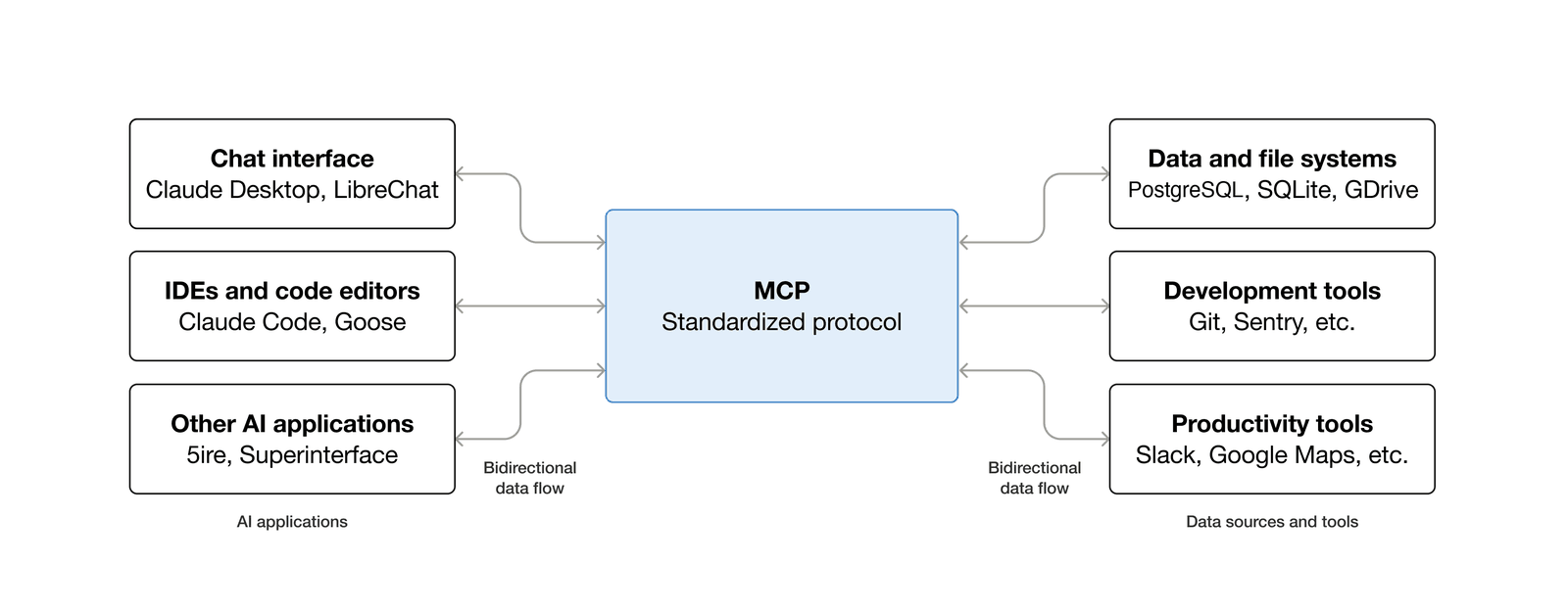
Tool makers build one MCP server and it works with many AI apps; users can plug company tools into AI with a few settings. But the easier connections get, the more carefully you need to decide which server gets which permissions. Data you send to an MCP server follows the retention policy of whoever runs that server.[19] The safety rules in section 10 apply here too.
12Browser agents: AI that operates websitesGoing further
Build enough automations and you will hit a wall: the site you need offers no API (a door for programs to talk to each other) at all. Old internal portals and vendor sites are often like this. That is where browser agents come in. The AI reads a screenshot or the page’s structure, decides where to click and what to type, and moves through the website.
Unlike a web scraper that follows a fixed map, it finds its way again even if the layout changes a little. How it reads the page varies by tool. Well-known options include the open-source Browser Use and Browserbase’s Stagehand, while Microsoft’s Playwright MCP mainly reads the “accessibility tree”, a structured description of the page, instead of screenshots. It is like finding your way with the building directory instead of a photo, so no vision model is needed to find buttons and fields.[24][25][26] OpenAI’s Operator, launched in January 2025, was folded into “ChatGPT agent” that July.[27]
A made-up store to show the sequence of actions.

The limits are clear too. CAPTCHAs, two-factor authentication and anti-bot walls stop them easily. For now, the realistic use is narrow, repetitive web work, such as collecting competitor prices or filling the same form in an old portal, with a person checking the results. Curious about AI that works inside the browser? Read our AI browser roundup.
13From operator to conductor
Bringing in AI agents does not make work disappear. It changes its shape: from an operator who handles every item by hand to a conductor and editor who directs several AIs and automations and owns the quality of the result.
Trying to automate the whole company at once is a good way to fail. Instead, pick one repetitive task that takes 30 minutes a day but needs almost no complex judgment. Decide whether it runs on rules, gets an AI station or goes to an agent, and where a person approves, then start with a small experiment.
Case file #1042 closedAnd customer #1042? The AI looked up the payment, wrote a reply draft that survived the red pen, and a staff member approved the refund after checking it against the payment record. The AI did not do it all, and neither did the people. That is what handing work to AI realistically looks like today.
And as the Bank of Korea analysis showed, saving time does not automatically mean getting more done. You only gain when you decide where the saved time goes. When AI writes the first draft, people add judgment and automation connects the steps, an agent stops being a scary replacement and becomes a dependable digital colleague. Want real cases of AI crossing the line? Read our roundup of AI agent control failures.
Five questions readers ask next
How are chatbots, AI workflows and AI agents different?
A chatbot answers what you ask. An AI workflow follows steps a person laid out, with AI handling some judgment calls such as sorting or drafting. An agent takes a goal and decides for itself what to look up, which tools to use and what to do next. Many chatbots now have agent features, so the line is getting blurry.
Can I start without knowing how to code?
Yes. Zapier and Make let you connect blocks on screen, but their free tiers differ. Zapier's free plan gives 100 tasks a month and two-step Zaps only, so AI sorting followed by branches needs a paid plan (new accounts get a 14-day trial). Make's free plan lets you test multi-step flows within 1,000 credits a month. Some features, such as human approval steps, are paid.
What should I hand off first?
Work that repeats every day and is easy to undo if it goes wrong: sorting email, summarizing meeting notes, drafting weekly reports. Anything that spends money or leaves the company should run only after a person approves it.
Who is responsible when the AI gets it wrong?
In the end, the people and the company using the result. That is why risky steps get human approval, and why you keep a record of who approved what.
Is it safe to put company data into AI tools?
It depends on the tool and plan. Check separately whether your inputs are used for training and how long they are kept, mask personal data, and grant only the access you need. Self-hosting n8n keeps the automation itself in-house, but if you connect an outside AI API, the data it processes is sent to that service. If data must stay inside, check where the AI model runs too.
Sources
- [1]Bank of Korea · BOK Issue Note 2026-12: Does AI adoption improve productivity? Effects over the first three years (Korean)
- [2]Hankyung · Bank of Korea issue note: generative AI use and working hours (2026-06-07, Korean)
- [3]Money Today · Non-developers automate work with AI (2026-04-05, Korean)
- [4]Seoul Economic Daily · LG Uplus AX task force targets 95% lower ad production costs (2025-05-18, Korean)
- [5]Make Help Center · Error handlers
- [6]Google Cloud · What are AI agents?
- [7]OpenAI · A practical guide to building agents (2025)
- [8]Anthropic · Building effective agents (2024.12)
- [9]Zapier · Plans & Pricing
- [10]Zapier Help · Request approval with Human in the Loop
- [11]Make · Pricing (10,000 credits/mo, USD)
- [12]n8n · Pricing
- [13]n8n Docs · Sustainable Use License (fair-code model)
- [14]n8n Docs · Human-in-the-loop for AI tool calls
- [15]Relay.app · Shutdown notice (2026.09)
- [16]OpenAI · Structured Outputs (Handling mistakes)
- [17]Zapier Help · Find and update spreadsheet rows in Google Sheets
- [18]Sharma et al. · Towards Understanding Sycophancy in Language Models (2023)
- [19]OpenAI · Your data: training, abuse monitoring logs and retention
- [20]n8n Docs · Self-hosted AI Starter Kit (n8n + Ollama)
- [21]Anthropic · Introducing the Model Context Protocol (2024.11.25)
- [22]Model Context Protocol · What is MCP?
- [23]Model Context Protocol · Architecture overview
- [24]Browser Use (GitHub)
- [25]Browserbase · Stagehand (GitHub)
- [26]Microsoft · Playwright MCP (GitHub)
- [27]OpenAI · Introducing Operator (update 2025.07.17: now ChatGPT agent)
We checked official docs, pricing pages, research and news reports first. Prices and features are as of October 9, 2026 and change often, so check again before you buy. Make prices are for 10,000 credits a month in US dollars and can look different by volume and currency. LG Uplus’s 95% is a target, not a reported result. Figures and screens are shown with credit for explanation.
Get the next AI Tech Note
Want new-post alerts? Use the sign-up form on the home page.
See how to subscribe ↗