One Security Setting Switched Off My Blog’s Cache for Three Days: CSP Nonces vs. Cloudflare Caching, MeasuredAn “observe only” security policy sent every visit straight to the origin server. How I found it, what I turned off, and what it takes to keep both
On the morning of October 22, 2026, as the first step in rolling out a Content Security Policy (CSP) on this blog, I turned on “observe-only” mode. It doesn’t block any scripts. It only records what would have been blocked. It looked harmless.
Along with it, the site’s page cache switched off completely. For the next three days every visit went past Cloudflare straight to the origin server. This post is the record of those three days: what turned off the cache, how it was spotted, and how much slower pages were, using numbers I actually measured.
- A CSP that puts a fresh one-time value (a nonce) in every response does not fit a cache that hands the same page to many visitors. So when it went live, caching was switched off for every page.
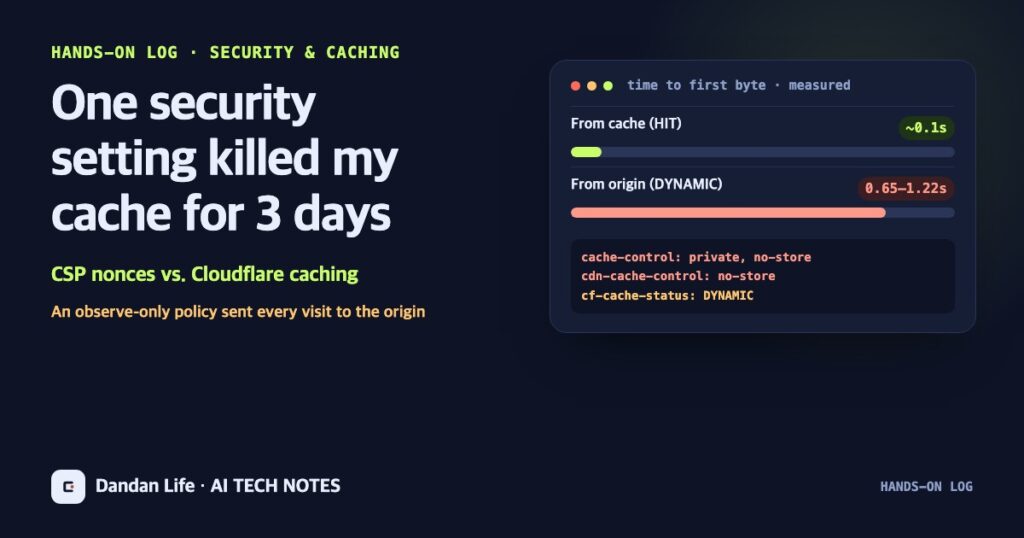
- Measured on the night of October 26, pages served from the cache mostly arrived in about 0.1 seconds; pages fetched from the origin took 0.65 to 1.22 seconds. Meanwhile, observe-only mode collected almost nothing, because there was no collector to receive its reports.
- I turned observe-only mode off and brought the cache back, keeping the basic security headers that are actually enforced. To have both CSP and caching, the nonce has to be swapped in at the edge, or the policy has to use hashes.
01CSP and nonces, simply
A Content Security Policy (CSP) is a note a web page sends to the browser: “only these scripts may run on this page.” If someone sneaks a script into a post or a comment, the browser won’t run it unless the note allows it.
A nonce is a one-time password used in that note. Each time the server sends a response, it creates a new value, writes it into the note and attaches the same value to the page’s genuine scripts. The browser runs only scripts with the matching value. Think of a venue that changes its wristband color every day. If you don’t know today’s color, you don’t get in.
Observe-only mode (Report-Only) sends that note as a warning only. Scripts that break the rules are not blocked; they are just recorded. It is a common way to check that nothing breaks before you start blocking for real.
02Why the cache went off
The catch is “a new value every time.” A cache like Cloudflare’s stores a page once and hands the same copy to the next visitors. Every visitor would then receive the same nonce, like a wristband color that hasn’t changed for days. Anyone who learns that value could attach it to an injected script and get past the check.
So the rollout chose to turn caching off entirely. Every page sent headers telling caches not to store it (Cache-Control: private, no-store and CDN-Cache-Control: no-store), and a Cloudflare rule turned off caching for every address except static files such as images and CSS. The rollout notes even warned that origin requests and response times could go up. The warning was there, but nobody had decided how long to accept that cost.
A nonce that changes with every response and a cache that reuses the same response clash by design. You give up one of them, or you add something that bridges the two.
03How it was spotted
This blog has an automated job that runs every three hours and pre-fills the cache with pages. Each report includes a line like this: “Pages: 94 (already cached 0, filled now 94, errors 0).” With a working cache, most pages should already be cached. It kept saying zero.
There was a reason nobody caught that number right away. At the time, the job was failing on every run because of an unrelated false alarm. With failure emails arriving constantly, nobody read the individual lines of the report. On the night of October 24, an AI agent that was fixing the checks read the report to the end and pointed out that pages were not being cached. Checking the response headers directly confirmed it: the home page, posts and the about page all said cf-cache-status: DYNAMIC, meaning they bypassed the cache.
Tracing the cause led back to the October 22 CSP observe-only rollout. The “don’t store” response headers and one Cloudflare rule were switching off caching for every page.
04Measuring the cost
On the night of October 26, after the cache was back, I loaded the same pages from Toronto three times each in two ways and measured the time to first byte. One was a normal visit served from the cache; the other deliberately skipped the cache and went to the origin server.
| Page (compressed size) | From the cache | From the origin |
|---|---|---|
| Home page (about 104 KB) | 0.05–0.08 s | 0.72–1.22 s |
| Claude Duet post (about 160 KB) | 0.07–0.22 s | 0.65–0.78 s |
| Harness post (about 168 KB) | 0.07–0.22 s | 0.65–0.69 s |
Loading a post whose cache was empty took 1.8 seconds the first time. Measured on the morning of October 22, before the problem started, uncached requests took anywhere from 1.6 to 6.7 seconds. When the origin is busy, it gets much slower.
Time is not the only cost. With the cache off, every visit sends 100 to 170 KB (compressed) from the origin server. This blog’s hosting plan has a daily traffic cap, so a burst of visits eats into it fast. As a rough calculation, 1 GB covers 6,000 to 10,000 page loads. Add search crawlers and link previews and the real margin is smaller.
On the other side, observe-only mode told me almost nothing in those three days. No collection address had been set up to receive its reports, so violations only flashed briefly in each visitor’s browser developer tools.
05What I turned off, and what I kept
On the afternoon of October 25 I turned off exactly two things: the WordPress snippet that added the observe-only CSP, and the Cloudflare rule that bypassed the HTML cache. Both are disabled, not deleted, so they can be switched back on at any time.
I was just as clear about what stays. The basic CSP that is actually enforced (rules such as not letting other sites embed these pages and not letting forms post to other addresses) and the other security headers are unchanged. Two snippets that had been adjusted for the rollout use standard WordPress functions, so they stay too.
After turning things off, I checked that:
- the origin no longer sends “don’t store” headers;
- loading a page twice serves the second load from the cache;
- all 63 public addresses in the sitemap were loaded once to refill the cache, and none returned an outdated copy from before the problem;
- logged-in admin screens and search result pages are still never cached;
- the ad and analytics code is still on the pages.
06Keeping both CSP and caching
This is not an argument for giving up on security. There are ways to have both, though this blog has not applied any of them yet.
- Swap the nonce at the edge. Store pages in the cache with a placeholder value, and have edge code such as Cloudflare Workers replace it with a fresh value for every response just before it goes out. Caching and one-time values live together. The cost is maintaining that edge code.
- Use hashes. List fingerprints (hashes) of the allowed inline scripts in the CSP. Same content, same fingerprint, so the page can be cached. The cost is updating the fingerprint every time a script changes.
- If you observe again, set up the collector and the time limit first. Decide where reports go, how long to observe, and whether you accept the cost for that period.
075 lessons
- On days you change security headers, check the cache. One line,
cf-cache-status, is enough. DYNAMIC instead of HIT means the cache isn’t working. - Observe-only is not free. “Doesn’t block anything” did not mean “costs nothing.”
- Observation without a collector isn’t observation. With nowhere to gather the results, only the cost remains.
- Read the numbers in your reports. “Already cached 0” was printed every time for three days. When failure alerts repeat, lines like that are the first to get buried.
- Write down how to undo it first. The rollout notes said exactly what to turn off to go back, so recovery took two switches.
Other incidents from running the site that month are in my month of letting an AI agent run the blog, and the story of the checks that raised false alarms is in a month with an automated fact checker.
Sources and scope of this post
This post is based on this blog’s operations log, the CSP rollout notes, the automated check reports and response times I measured on the night of October 26 (Toronto time). The measurements are a small sample, three loads per page from one location, so numbers from other places or times may differ. For security reasons, the full policy text and server configuration details are not included.